Rechercher dans ce blog

mercredi 4 avril 2012

Version 1.7.2 is on the store

NEW FEATURES: 
• aperture list now starts from 1.4, and goes on with stand numbers : 2, 2.8, 4 etc., allowing for standard aperture and lens.
• Suitable for WET COLLODION : the aperture range together with sensitivity settings starting as low as 0.25 ISO allows for wet collodion usage

ENJOY ANY SLOW PROCESS : pinhole, wet-collodion.

BUG correction :
• optimal diametre now immediatly displayed when switching aperture modes between "predefined" and "computed"
• aperture properly restored when waking from sleep (used to set to "f:150" no matter was the "real" stored value
• selected tab restored when waking from sleep 
http://itunes.com/app/pinholeassist 

mardi 6 mars 2012

Look on facebook

MOst of the Pinhole assist related info happens here :
http://www.facebook.com/pages/Pinhole-Assist/271190279569897

Current version is 1.7, with version 1.7.1 arroving at the end of the week.
THe latest version includes a calculator for using a "normal" camera as a lightmeter (simply rpeort aperture, speed and iso to get the light measure), as well as a bubble level and a timer.

jeudi 8 décembre 2011

New reciprocity charts for Pinhole Assist

With Pinhole Assist now supporting multiple reciprocity charts, new charts were expected. Here they are.


Use iTunes to add the files : In iTunes, select your iPod/iPhone, select the "Apps" tab, scroll down : you will see at the bottom an array called apps. Apps are on the left. Select Pinhole Assit : you will have clist of file. Drag and drop there the files extracted from the zip.

samedi 19 novembre 2011

Pinhole Assist v 1.5


A new version of Pinhole Assist is out on the App Store.


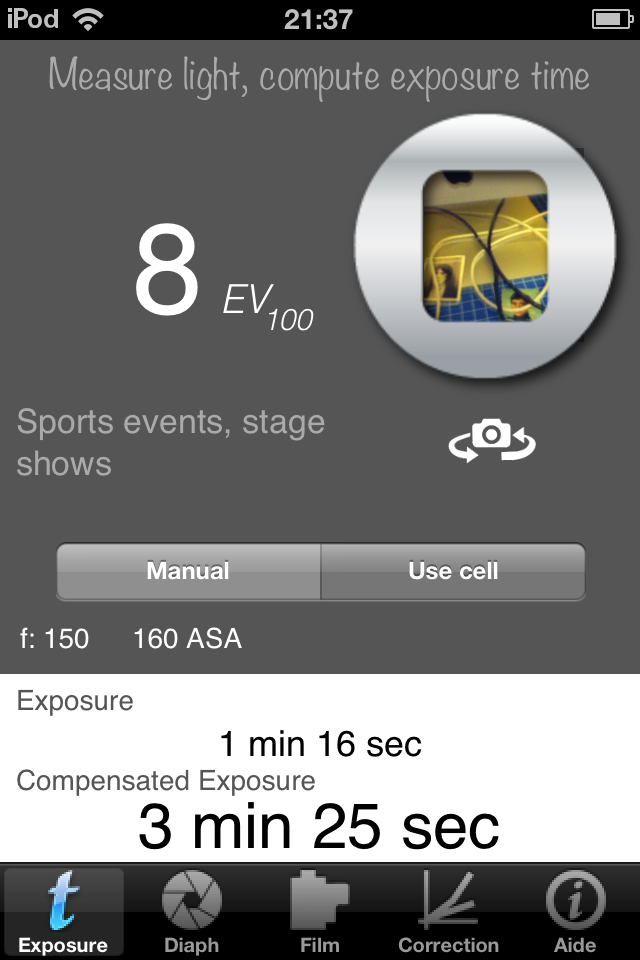
With "Pinhole Assist", argentic pinhole photography is even easier.

• Compute exposure time ;
• Mesure light;
• Enter your camera aperture from the predefined list or compute it;
• Let the assistant automatically compensate for reciprocity of film (correction for long exposures), or use your own curves.

Estimate light or measure it directly with the camera.

Enter your camera aperture or compute it from your camera geometry. Many pinhole camera settings are already included (Zeroimage™, Diana™ pinhole)

Select your film's sensitivity (ASA) and decide if you use reciprocity compensation.

Select the reciprocity curve you want to use.Via iTunes, you can add/edit/delete the reciprocity correction curves. Go to the app Web Site for further instructions.

Tip #1: adjust cell measurement via the iPhone/iPod "Settings" application.

Tip #2: if using an external cell, set its sensibility to 100 ASA.

Tip #3 : settings for Zeoroimage pinhole cams , holga p inholes and several others are prefdefined !

Light measurement is only available on devices with camera. The manual setting allows you do do estimation with text indication, or use an external cell.


* BETTER CELL ACCURACY,
* BETTER INDICATION OF LONG EXPOSURES,
* SUPPORT FOR HARMAN TiTAN CAMERA (f:206, 250 and 288),
* ADDED DIAPHGRAM VALUES OF 2,4,8,16 for calibrating purpose (use these value to compare measure with your "classical" camera".
* ADDED RATINGS SUPPORT
V 1.5
* NOW SUPPORTS MULTIPLE RECIPROCITY CURVES AND DATA VISUALISATION
* NEW LOOK AND FEEL FOR A CLEARER NAVIGATION


lundi 3 octobre 2011

How to make a custom reciprocity chart for "Pinhole Assist" [updated] [updated]


How to have your own reciprocity chart with Pinhole Assist. A simple text editing can do it.

First connect your device to your PC ou Mac. Open iTunes. . copy the "Reciprocity_film.plist" file to your hard disk. Do not change the file name ! The next major version will acocmadate any name. For the time being, you need to keep the same filename.


Now we will edit it. For PC user, use Notepad or better: Notepad++. For mac, use textEdit (TextWrangler (free) is a must). The file look like this :


Inside the file you only need to modify the parts that looks like this:


That part means that for 15 seconds (all times are in seconds) the corrected time including reciprocity is 2 * 15 seconds : the number 2 is a multiplying factor seconds.Only add these values in ascending order. Save the file and copy it to iTunes.

Nota : The first values are expected to be 1 second and the correction value for 1 second (here 1 and 1.5 ).

Do no be afraid of a mistake : if something is wrong, delete the file and restart (from Springboard) Pinhole Assist : a new file will be generated.


Here is a link to reciprocity for paper. (use with caution: these values is clearly not fitted for multigrade RC - I use no correction fir Ilford Multigrade RC below 30 minutes)
Rename this file to Reciprocity_film.plist

[update 08/10/2011]: the dfescription rrefers to the right type of file (where the entry is if type : value- coeff).
12/11/2012 : link updated


mercredi 28 septembre 2011

Assistant sténopé


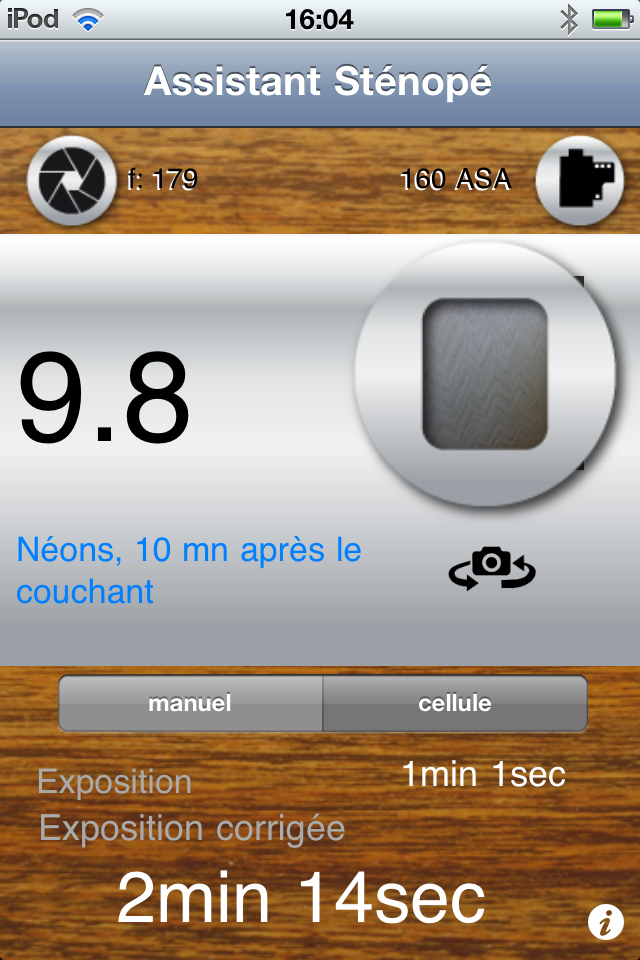
Avec Assistant Sténopé, la photo au sténopé n'a jamais été aussi simple.


• Calculez le temps d'exposition ;

• Mesurez la lumière ;

• Retrouvez votre appareil dans une liste prédéfinie ou calculez son ouverture ;

• Prenez en compte la réciprocité du film avec un réglage prédéfini ou utilisez vos propres courbes.


Estimez manuellement la lumière ou mesurez la avec la cellule (les valeurs IL sont étalonnées pour 100 ASA)

Entrez le diaphragme de votre appareil (plusieurs appareil comme les Zeroimage™ou les Diana™ pinhole sont préconfigurés) ou calculez le diaphragme à partir des dimensions de votre sténopé.


Sélectionnez votre film et décidez si vous voulez utiliser le calcul de réciprocité.


Truc n°1 : vous pouvez régler la cellule via les "Réglages" de l'iPhone.


Truc n° 2 : Les plus exigeants pourront, via iTunes, modifier la courbe de correction de réciprocité. Rendez vous sur le site Web du Bord de la piscine pour des instructions précises.


Truc n°3 : si votre appareil n'a pas de cellule, vous ouvrez faire une estimation manuelle grâce aux indications. Si vous utilisez une cellule externe qui affiche les IL (Indice de luminosité, EV en anglais), réglez là sur 100 ASA.


mercredi 21 septembre 2011

Pinhole Assist [en]


With "Pinhole Assist" for iPhone/iPod Touch, pinhole photography is even easier.


• Compute exposure time ;

• Mesure light;

• Enter your camera aperture from the predefined list or compute it;

• Let the assistant automatically compensate for reciprocity of film (correction for long exposures), or use your own curves.


Estimate light or measure it directly with the camera


Enter your camera aperture or compute aperture from your camera geometry. Many pinhole camera settings are already included (Zeroimage™, Diana™ pinhole)


Select your film's sensitivity and decide if you use reciprocity compensation.


Tip #1 : adjust cell measurement via the iPhone/iPod "Settings" application.


Tip #2 : Via iTunes, you can access and edit the reciprocity correction curve. Go to the app Web Site for further instructions.


Nota : light measurement is only available on devices with camera. The manual setting allows you do do estimation with text indication, or use an external cell.


Tip #3 : if using an external cell, set its sensibility to 100 ASA.


Available on the Apple App Store